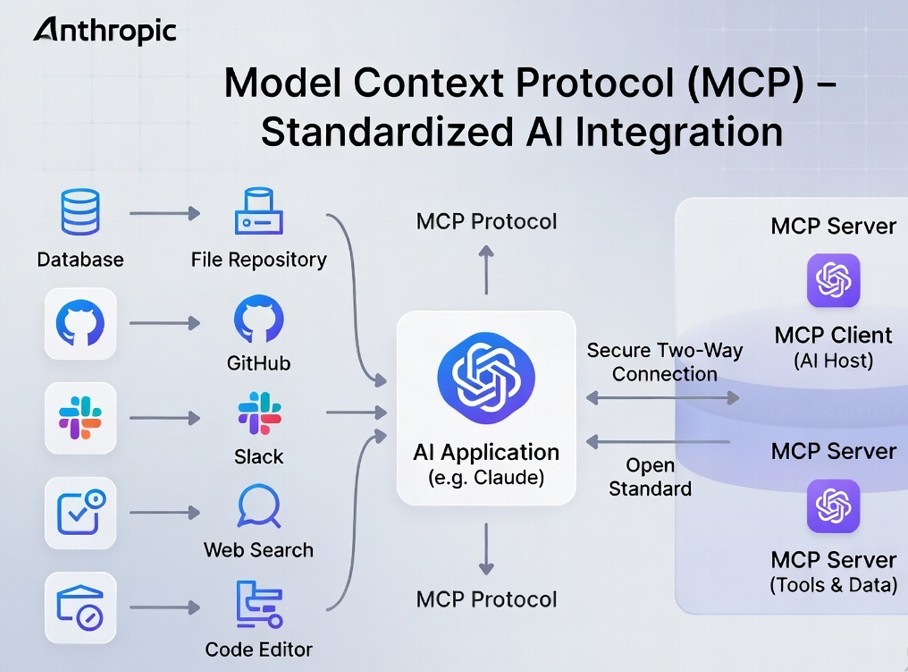
The big picture: MCP (Model Context Protocol) is an open standard that lets AI assistants connect to any data source – files, databases, APIs, websites – using a single, unified interface. Think of it as USB‑C for AI: one protocol to rule them all.
Why MCP Exists: The Tower of Babel Problem
For years, building an AI agent that could read your Google Drive, query a SQL database, and search the web meant writing custom code for every single integration. Each data source had its own API, authentication method, and data format. This fragmentation was the single biggest barrier to practical AI agents.
Enter MCP. Introduced by Anthropic in late 2024 and quickly adopted by the open‑source community, MCP provides a standard way for AI models to discover, access, and interact with data sources. Instead of writing 50 different integrations, you write one MCP server – and any MCP‑compatible AI client can use it.
How MCP Works (In Plain English)
MCP follows a simple client‑server architecture:
- MCP Host – The AI application (e.g., Claude Desktop, Continue.dev, or a custom agent). It wants to access your data.
- MCP Client – Built into the host. It speaks the MCP protocol.
- MCP Server – A lightweight program that exposes a specific data source (files, database, API) to any MCP client.
When you ask an AI agent to “summarise all my emails from last week”, the MCP client sends a request to the email MCP server, which fetches the emails and returns them in a format the AI understands. The AI never needs to know whether your emails are on Gmail, Outlook, or a custom server – the MCP server handles the details.
Real‑world example: Using Claude Desktop with MCP, you can install a file system MCP server. Suddenly, Claude can read, write, and organise files on your computer – no copy‑pasting needed. Install a GitHub MCP server, and Claude can create repositories, push code, and open pull requests directly.
Why 97 Million Installs Matter
That number isn't hype. Combined downloads from npm (@modelcontextprotocol/sdk) and pip (mcp) have surpassed 97 million as of April 2026. Here's why that's significant:
- Network effect – The more servers exist, the more useful MCP becomes. Developers are already building MCP servers for Slack, Notion, GitHub, PostgreSQL, Redis, and hundreds of other services.
- Vendor neutrality – MCP isn't owned by any single company. Anthropic open‑sourced it, but it works with any AI model – Claude, GPT, Llama, Gemini, and open‑source agents.
- Future‑proofing – As AI agents become more powerful, they'll need access to more data. MCP provides a standard that won't lock you into a single ecosystem.
Who's Using MCP Right Now?
The adoption has been remarkable for a protocol less than two years old:
- Claude Desktop – Built‑in MCP client support. You can add community servers with a single line in a config file.
- Continue.dev – The popular VS Code extension now supports MCP, letting your coding assistant access your entire development environment.
- Open‑source agents – Projects like OpenClaw AI and AutoGPT have added MCP support, allowing them to interact with real‑world tools.
- Enterprise – Companies are using MCP to connect internal AI assistants to their CRM, ERP, and knowledge bases without rebuilding integrations.
MCP vs. Function Calling vs. Custom APIs
You might be wondering: isn't this just function calling? Not exactly.
- Function calling – The AI model can call predefined functions, but you still need to write the function implementation. Works for a few tools, doesn't scale.
- Custom APIs – Every integration is bespoke. Works for large companies, but not for the open‑source ecosystem.
- MCP – A standard wire protocol that separates the AI from the data source. Write a server once, use it with any MCP client. Built for scale and community contribution.
How to Get Started With MCP (For Developers)
If you're a developer, getting started with MCP takes about five minutes:
- Install the SDK –
npm install @modelcontextprotocol/sdkorpip install mcp - Run a community server – Many servers are available as npm or pip packages. For example, the filesystem server:
npx -y @modelcontextprotocol/server-filesystem /path/to/allow - Connect Claude Desktop – Edit
claude_desktop_config.jsonto add the server. Restart Claude, and you're done. - Build your own server – The SDK makes it trivial to expose any data source as an MCP server.
The official MCP documentation and GitHub repository have detailed examples for every major language.
For non‑developers: You don't need to code to benefit from MCP. Tools like Claude Desktop and Continue.dev make it easy to install pre‑built MCP servers – just like installing browser extensions.
The Future: MCP as the Backbone of AI Agents
2026 is the year AI agents go from demos to daily drivers. And MCP is the plumbing that makes it possible. Expect to see:
- More pre‑built servers – Every major SaaS will offer an official MCP server.
- Agent orchestration – Multi‑agent systems will use MCP to share context and delegate tasks.
- Enterprise adoption – Companies will standardise on MCP for internal AI integrations.
- Local‑first agents – Because MCP servers run locally, your data never leaves your machine unless you choose to share it.
The 97 million installs are just the beginning. As AI agents become ubiquitous, MCP will be the silent protocol that connects them to the world.