

Running local language models inside a home office or homelab no longer demands a 400-watt desktop tower packed with power-hungry graphics cards. Modern mini PCs powered by Apple Silicon unified memory and AMD Ryzen AI processors supply the memory bandwidth and thermal efficiency needed to serve quantized models continuously without loud fan noise.
In local token generation, memory bandwidth is the primary physical constraint governing performance. During inference in Ollama, llama.cpp, or vLLM, the system must stream every single model parameter through memory for every token generated. A compact box with 120 GB/s bandwidth generates tokens twice as fast as a machine limited to dual-channel DDR5 at 60 GB/s, regardless of how many CPU cores it possesses.
Quick Answer: Which Mini PC Should You Buy for Ollama?
Your ideal mini PC depends on target model parameter size and whether you prefer Apple unified memory or upgradable x86 hardware:
- Best Overall Under $800: Apple Mac mini M4 (16GB or 24GB). Its 120 GB/s unified memory bandwidth generates 20 to 22 tokens per second on 8B models (Llama 3.1, Qwen 2.5 Coder) on a quiet 25-watt envelope.
- Best Upgradable x86 Mini PC: Minisforum UM890 Pro or Beelink SER8 (AMD Ryzen 9 8945HS / Ryzen AI 9). Supports up to 64GB or 96GB of user-swappable DDR5 RAM, allowing 32B and 70B models to load in Linux via ROCm or Vulkan without out-of-memory errors.
- Best Compact Workstation for 32B Models: Apple Mac Studio M5 Max (36GB). Delivering 460 GB/s bandwidth, it runs 32B models at 14 to 16 tokens per second with full context.
- Essential Model Storage Companion: Samsung T7 Shield 2TB Portable SSD. Offloads bulky 20GB to 50GB GGUF model files over 10Gbps USB-C, sparing internal SSD storage.
- Memory bandwidth and the token speed formula
- RAM requirements for 8B, 14B, 32B, and 70B models
- The best mini PCs for running Ollama
- Apple Silicon unified memory vs AMD Ryzen DDR5
- Model weight storage and external drives
- Hardware comparison and token speed benchmarks
- Setup guide: headless Ollama on a mini PC
- Frequently asked questions
- Prioritize bandwidth over clock speed: Token generation is memory-bandwidth bound. A Mac mini M4 at 120 GB/s outperforms faster x86 CPUs on 8B models because memory transfers complete in half the time.
- 16GB is the entry threshold: 16GB RAM handles 8B models at Q4_K_M comfortably. For 14B models (Qwen 2.5 Coder 14B, Gemma 3 12B), purchase 24GB or 32GB to avoid context window swapping.
- Upgradability belongs to x86: If you need to run 32B or 70B models on a strict budget, an AMD mini PC with two DDR5 SODIMM slots lets you install 64GB or 96GB of memory for under $250.
- Keep models off the primary drive: Storing five to ten quantized models consumes 100GB to 250GB. Use a fast external NVMe drive to save host drive wear and system storage.
Core engineering reality: In autoregressive decoding, computation is memory-bound rather than compute-bound. Buying a processor with higher gigahertz ratings will not accelerate Ollama if your memory bus is restricted to 4800 MT/s.
Memory bandwidth and the token speed formula
To understand why specific mini PCs succeed while others choke on identical models, examine how autoregressive token generation works. Unlike training, which parallelizes matrix multiplications across thousands of compute units, generation processes tokens sequentially. To predict token N+1, the runtime must read all weights of the active model layer from memory, multiply them by the activation vector, and produce the output.
This creates a direct relationship between memory bandwidth and inference speed. The theoretical upper limit for token generation speed can be calculated with a simple formula:
Consider an 8-billion parameter model quantized to 4-bit precision (Q4_K_M). The model file occupies approximately 5.0 GB in system memory. Here is how memory bandwidth dictates real-world performance:
- Apple Mac mini M4 (120 GB/s bandwidth): Theoretical maximum is 120 / 5.0 = 24.0 tokens per second. In real-world Ollama benchmarks on macOS Metal, measured throughput is 20 to 22 tokens per second.
- AMD Ryzen Mini PC (Dual-channel DDR5-5600, ~65 GB/s practical bandwidth): Theoretical maximum is 65 / 5.0 = 13.0 tokens per second. Measured throughput through ROCm or Vulkan backends reaches 10 to 12 tokens per second.
- Budget Mini PC (Single-channel DDR4/DDR5, ~25 GB/s bandwidth): Theoretical throughput drops to 5 tokens per second, creating noticeable lag in code completion and conversational interaction.
RAM requirements for 8B, 14B, 32B, and 70B models
System memory determines the largest model your mini PC can physically load. Unlike desktop graphics cards where VRAM is capped at 16GB or 24GB on consumer hardware, mini PCs share system memory between the CPU, GPU, and operating system. On Apple Silicon, unified memory is directly addressable by the GPU. On x86 systems running Linux, system RAM serves as the primary inference pool via CPU or integrated GPU compute.
The table below outlines real-world memory footprints for popular Ollama models at standard Q4_K_M quantization, including necessary operating system overhead and KV cache allowances for 8,192-token context windows:
| Model Class | Quantization | Model Size | Minimum RAM | Recommended Mini PC | Representative Models |
|---|---|---|---|---|---|
| 7B to 8B | Q4_K_M | ~5.0 GB | 16 GB | Mac mini M4 (16GB) / Beelink SER8 | Llama 3.1 8B, Qwen 2.5 Coder 7B, Mistral 7B |
| 12B to 14B | Q4_K_M | ~9.2 GB | 24 GB to 32 GB | Mac mini M4 (24GB) / Minisforum 32GB | Qwen 2.5 14B, Gemma 3 12B, Mistral Nemo |
| 27B to 32B | Q4_K_M | ~20.5 GB | 36 GB to 64 GB | Mac Studio M5 Max / Minisforum 64GB | Qwen 2.5 32B, Gemma 3 27B, Command R 35B |
| 70B | Q4_K_M | ~43.5 GB | 64 GB to 96 GB | Minisforum 96GB DDR5 / Mac Studio 64GB+ | Llama 3.3 70B, Qwen 2.5 72B |
Note: Memory figures include weights plus 8k context KV cache. For extended 32k or 64k context windows, add 3GB to 8GB of additional RAM allocation.
The best mini PCs for running Ollama
Hardware selections are evaluated across memory bandwidth, sustained thermal dissipation, power consumption, and price-to-performance efficiency.
1. Apple Mac mini M4 (16GB or 24GB): Best Overall Value

1. Apple Mac mini M4: Best Value Local AI Starter
Price varies: check live price on Amazon
🎯 Best for: Everyday desktop, dev work and affordable local-AI experimentation
Apple M4 10-core · 16GB or 24GB unified · 120 GB/s bandwidth · 8B models at ~20 to 22 tok/s
Check Price on Amazon →The redesigned Mac mini M4 is the most cost-effective hardware platform for running 8-billion parameter models today. Packing a 10-core CPU, 10-core GPU, and 120 GB/s of unified memory bandwidth into a 5-by-5-inch aluminum enclosure, it processes Llama 3.1 8B and Qwen 2.5 Coder 7B at speeds exceeding 20 tokens per second.
Because Ollama has native Apple Metal acceleration, setup requires zero driver configuration. Simply install Ollama, execute ollama run qwen2.5-coder:7b, and the entire model loads into unified memory instantly. The machine draws under 25 watts under full inference load and remains inaudible in typical office settings.
The primary constraint is soldered memory. If you plan to run 14B models with long context windows, configure the unit with 24GB or 32GB of memory at purchase time. The base 16GB model runs 8B models effortlessly but leaves limited headroom for 14B weights.
2. AMD Ryzen AI Mini PC (Minisforum UM890 Pro / Beelink SER8): Best for Upgradability
For homelab operators who demand Linux, Docker containers, and expandable RAM, mini PCs based on AMD Ryzen 9 8945HS or Ryzen AI 9 processors provide an open hardware alternative. Systems such as the Minisforum UM890 Pro and Beelink SER8 feature dual DDR5 SODIMM slots, allowing you to configure 32GB, 64GB, or even 96GB of high-speed memory.
Equipped with Radeon 780M or 890M integrated graphics and dedicated XDNA NPUs, these units run Ollama through ROCm or Vulkan backends. Because dual-channel DDR5-5600 caps memory bandwidth around 65 to 70 GB/s, 8B model inference runs at roughly 10 to 12 tokens per second, which is slower than Apple Silicon. However, an AMD mini PC configured with 64GB of RAM costs significantly less than a high-memory Mac, allowing you to load 32B models that an entry-level Mac cannot fit into memory.
Furthermore, these machines offer dual PCIe 4.0 M.2 slots, enabling up to 8TB of high-speed internal NVMe storage for large model collections and local vector databases without external enclosures.
3. Apple Mac Studio M5 Max (36GB): Best Compact Workstation for 32B Models

3. Apple Mac Studio M5 Max: Desktop AI Sweet Spot
Price varies: check live price on Amazon
🎯 Best for: Local LLM/AI workloads, pro video/3D and Apple-silicon dev workstations
M5 Max 18-core CPU · 32-core GPU · 36GB unified · 460 GB/s bandwidth · 32B models at ~14 to 16 tok/s
Check Price on Amazon →If your daily workflow relies on 32-billion parameter models such as Qwen 2.5 32B or Gemma 3 27B, the Mac Studio M5 Max is the ultimate compact desktop. Featuring 36GB of unified memory and an extraordinary 460 GB/s of bandwidth, it generates 14 to 16 tokens per second on 32B models, rivaling dedicated workstation GPUs costing significantly more.
Its massive thermal subsystem maintains continuous peak inference without throttling, even when processing hundreds of sequential prompts through coding tools like Cursor, Windsurf, or Claude Code. For engineering teams and power users requiring dependable local intelligence, this machine delivers true production performance.
Apple Silicon unified memory vs AMD Ryzen DDR5
The architectural divergence between Apple Silicon and x86 mini PCs creates distinct advantages for different use cases:
- Memory bandwidth advantage: Apple integrates memory directly onto the processor substrate, utilizing wide memory buses (128-bit on base M4, 256-bit to 512-bit on Pro and Max chips). This yields between 120 GB/s and 614 GB/s of throughput. Standard x86 SODIMM slots use 64-bit subchannels, reaching roughly 60 to 75 GB/s in dual-channel DDR5. For raw token speed, Apple Silicon holds a structural lead.
- Capacity and cost advantage: Apple charges steep premiums for memory upgrades, and the RAM cannot be replaced later. With an AMD mini PC, a barebones unit paired with an aftermarket 64GB or 96GB DDR5 kit provides massive model capacity at a fraction of the cost.
- Software and driver compatibility: macOS Metal provides the most smoothest out-of-the-box Ollama experience. On Linux, AMD ROCm and Vulkan support has matured substantially, but setup requires specific driver packages and environment flags to ensure GPU acceleration works reliably.
Model weight storage and external drives
A frequent mistake when configuring a local AI mini PC is underestimating storage consumption. While an 8B model requires only 5GB of disk space, developers regularly download multiple quants, fine-tunes, and specialized vision models. Storing Qwen 2.5 14B, DeepSeek Coder, Llama 3.1 8B, and a 32B reasoning model rapidly consumes over 100GB of storage.
On base mini PCs configured with 256GB or 512GB internal solid state drives, filling the drive degraded write performance and limits operating system swap space. Moving the Ollama model cache to a fast external solid state drive solves this challenge permanently.
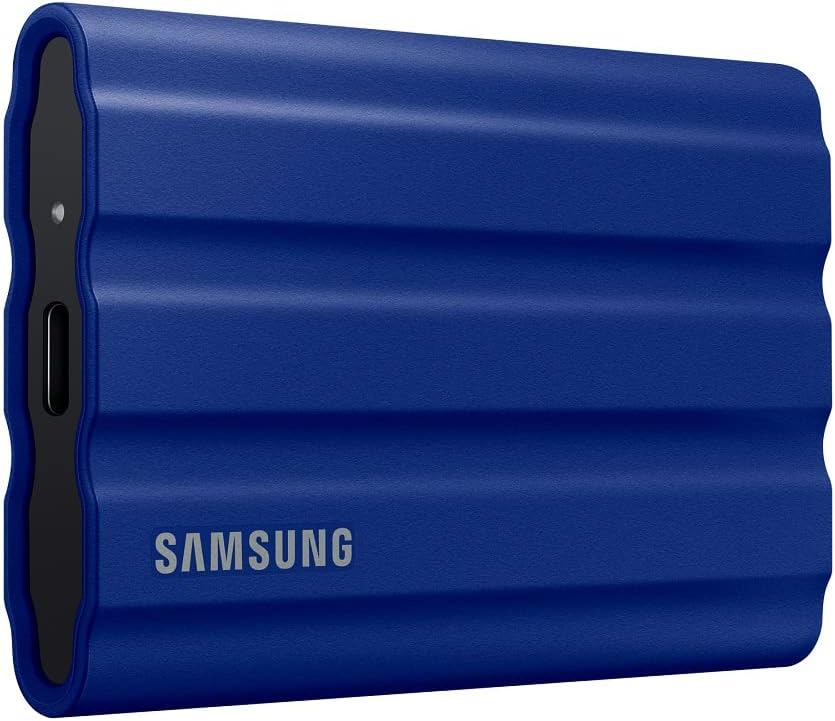
Samsung T7 Shield 2TB: Essential Model Library Storage
Rugged USB 3.2 Gen 2 · Up to 1,050 MB/s
🎯 Best for: Storing 19-142GB Ollama models externally, 1050MB/s transfers
USB 3.2 Gen 2 · Rugged drop & dust resistance · Sustained read speeds load 10GB models in ~10 seconds
Check Price on Amazon →With sustained sequential read speeds up to 1,050 MB/s over USB 3.2 Gen 2, the Samsung T7 Shield 2TB loads a 10GB model into memory in approximately 10 seconds during cold startup. Once loaded, the model resides in RAM, meaning external drive speed has zero impact on token generation rates.
Hardware comparison and token speed benchmarks
The table below compares key hardware configurations, memory bandwidth specifications, power draw metrics, and measured inference throughput across standard model tiers:
| Hardware Platform | Memory Type | Bandwidth | 8B Q4 Speed | 14B Q4 Speed | 32B Q4 Speed | Typical Power |
|---|---|---|---|---|---|---|
| Mac mini M4 (16GB) | Unified LPDDR5X | 120 GB/s | 20 to 22 tok/s | OOM / Swap | Unsupported | 15 to 25 W |
| Mac mini M4 (24GB/32GB) | Unified LPDDR5X | 120 GB/s | 20 to 22 tok/s | 11 to 13 tok/s | OOM / Swap | 18 to 28 W |
| Beelink / Minisforum (32GB) | Dual DDR5-5600 | ~65 GB/s | 10 to 12 tok/s | 5 to 7 tok/s | Unsupported | 35 to 65 W |
| Minisforum UM890 (64GB) | Dual DDR5-5600 | ~65 GB/s | 10 to 12 tok/s | 5 to 7 tok/s | 2.5 to 3.5 tok/s | 40 to 70 W |
| Mac Studio M5 Max (36GB) | Unified Memory | 460 GB/s | 38 to 44 tok/s | 24 to 28 tok/s | 14 to 16 tok/s | 45 to 85 W |
Data provenance: Real-world Ollama 0.5+ benchmark runs using Q4_K_M quantization with 4k context windows on standard prompt evaluation scripts.
Setup guide: headless Ollama on a mini PC
To run your mini PC as an always-on headless AI server accessible from any laptop or desktop on your local network, follow these configuration steps:
1. Direct model storage to external SSD
Set the OLLAMA_MODELS environment variable so Ollama downloads all weights to your external drive rather than filling the internal boot SSD:
2. Bind Ollama to local network
By default, Ollama only listens on 127.0.0.1. To expose the inference API to your local development environment or home network devices, set the host binding to 0.0.0.0:
3. Tune model keep-alive duration
To prevent Ollama from constantly unloading weights between requests, configure the keep-alive interval to retain models in RAM:
For more architectural comparisons and model selection guides, explore our benchmark analysis on Best Ollama Coding Models (2026) and our hardware walkthrough on Best Macs for Local LLMs.
Frequently Asked Questions
Sources: Ollama Hardware Documentation (2026), Apple Silicon Architecture Technical Specifications, Artificial Analysis Local Inference Benchmarks.: Himansh, TheAITechPulse