
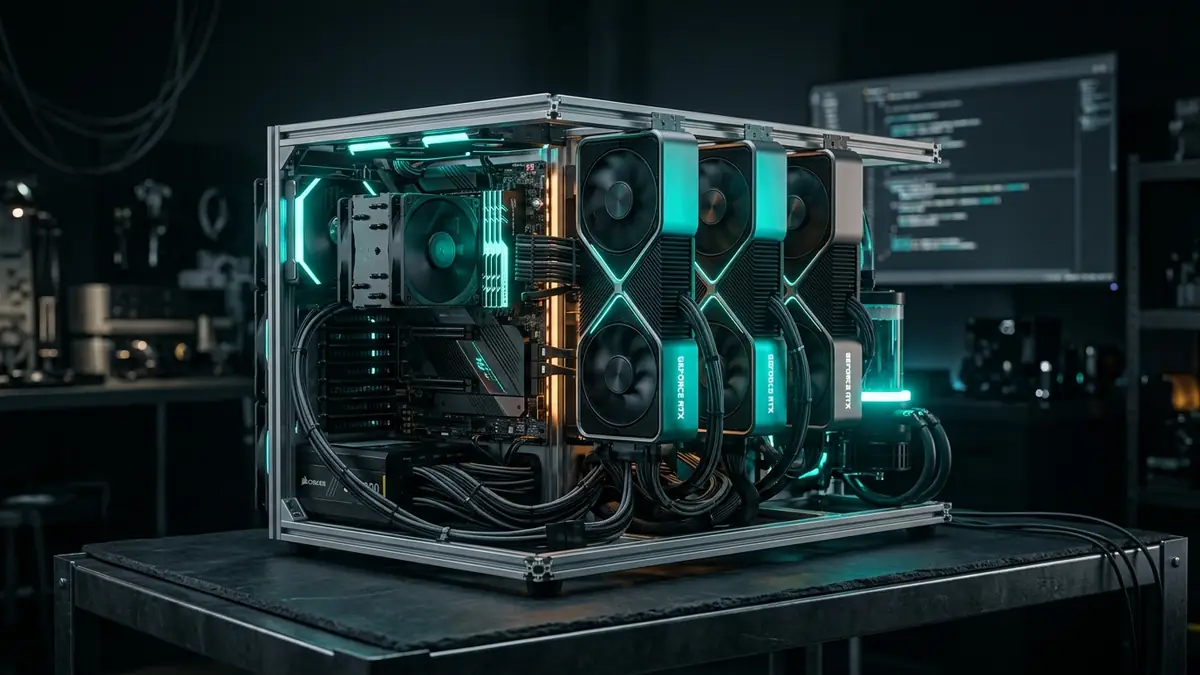
Building a dedicated home AI server in 2026 requires understanding two physical bottlenecks that consumer laptops cannot escape: memory bandwidth during token generation, and PCIe lane topology for multi-GPU deployment. A correctly configured server architecture resolves both, enabling local inference of 70-billion-parameter models at conversational speeds, local fine-tuning via QLoRA, and 24/7 API availability without cloud compute costs.
This guide covers every hardware and software decision in the construction stack, from GPU memory bus arithmetic to Docker Compose deployment. Four reference tiers span $650 to $4,900, with specific component recommendations grounded in secondary-market pricing data published through mid-2026.
Quick Answer: Which build tier should you start with?
Match your target model size to aggregate VRAM, not clock speeds.
- 8B to 14B models (solo developer): Tier 1 refurbished workstation with a single RTX 3060 12 GB or RTX 3090 24 GB, $650 to $950 total.
- 70B models at conversational speeds: Tier 2 dual-RTX 3090 with NVLink on a Lenovo P520 chassis, $2,200 to $2,700 total.
- Multi-tenant API or 100B+ MoE models: Tier 3 quad-RTX 3090 on an AMD EPYC SP3 board, $3,800 to $4,900 total.
- Silent, low-power single-user inference: Tier 4 AMD Ryzen AI Max+ 395 mini-PC with 128 GB unified LPDDR5X, $2,200 to $3,400.
- Hardware architecture and inference bottlenecks
- Accelerator silicon economics: GPU comparison table
- Host platform architecture: consumer vs. workstation vs. EPYC
- Electrical, thermal, and acoustic engineering
- OS configuration and software orchestration stack
- Reference build tiers and budget blueprints
- Implementation roadmap
- Frequently Asked Questions
- Bandwidth beats compute for decode: Token generation is memory-bandwidth-bound. A wider bus matters more than raw teraFLOPs.
- Account for KV cache, not just model weights: A 70B model at 64K context requires 6 to 16 GB of additional VRAM beyond static weight size.
- RTX 3090 is the cost-per-GB anchor: At ~$47/GB GDDR6X with NVLink support, it outperforms every alternative in dual-GPU configurations.
- Consumer platforms cap at two GPUs: AMD AM5 and Intel LGA1851 force x8/x8 PCIe splits; use a refurbished C422 workstation or EPYC board for x16/x16 native.
- Power-cap RTX 3090 to 220-240W: Drops thermal load by over 30% while reducing decode throughput by less than 4%.
Data sourced from published benchmark posts and secondary market pricing averaged from eBay/BackMarket, Q2-Q3 2026.
Key insight: For the cost of one RTX 5090 ($3,500 to $4,800), a builder assembles a complete four-GPU RTX 3090 node with 96 GB aggregate VRAM, four PCIe 4.0 x16 slots, and 256 GB octa-channel DDR4 ECC on an EPYC platform.
Hardware architecture and inference bottlenecks
LLM inference splits into two computationally distinct phases with fundamentally different hardware demands. Conflating them is the single most common cause of poorly performing home server builds.
Prefill phase: compute-bound processing
The prefill phase processes every input token in a single parallel pass through General Matrix-Matrix Multiplications. This stage saturates arithmetic logic units and scales directly with GPU clock frequencies, raw teraFLOPs, and Tensor Core generation. High-compute microarchitectures reduce Time-to-First-Token (TTFT) during prompt ingestion. For a 4,096-token system prompt, the Ada architecture's 82.6 TFLOPS FP16 (RTX 4090) versus Ampere's 71 TFLOPS FP16 (RTX 3090) creates a measurable TTFT difference on long prompts.
Decode phase: memory-bandwidth-bound generation
Token generation is strictly autoregressive, processing exactly one new token per iteration. Each step requires loading the entire model parameter weight state from VRAM into execution cores to evaluate that single token. Compute cores sit largely idle waiting for weights to traverse the memory bus. The theoretical decode ceiling is approximately: Memory Bandwidth (GB/s) divided by Model Size in memory (GB). On an RTX 3090 running a 40 GB Q4_K_M 70B model across two cards, this yields roughly 46 tok/s theoretical. Real-world vLLM results typically land at 15 to 22 tok/s due to KV cache overhead, synchronization latency, and batching dynamics.
KV cache memory footprint
Context window scaling introduces secondary memory pressure through the Key-Value cache, which stores intermediate attention keys and values from prior tokens to avoid redundant matrix operations. For Multi-Head Attention and Grouped-Query Attention architectures, KV cache memory scales linearly with sequence length, batch size, layer depth, and precision. On a dense 70B model, expanding context from 8,192 to 65,536 tokens consumes 6 to 16 GB of additional VRAM strictly for cache allocations, beyond the static weight footprint.
PCIe bus topology and tensor parallelism
When model footprints exceed a single GPU's VRAM boundary, workloads partition across multiple GPUs using Tensor Parallelism (TP) or Pipeline Parallelism (PP). Tensor Parallelism requires an all-reduce collective synchronization across the interconnect at every transformer layer. An 80-layer 70B model executes 80 discrete synchronization events per generated token. A full PCIe 4.0 x16 link provides approximately 31.5 GB/s unidirectional. PCIe 4.0 x8 or PCIe 3.0 x16 (approximately 15.75 GB/s) approximately doubles inter-card transfer latencies. NVLink bridges on RTX 3090 pairs deliver 112 GB/s bidirectional, yielding 10% to 50% throughput improvement depending on model and batch size.
Pipeline Parallelism partitions models by layer groups sequentially, transferring activations only at partition boundaries. It accommodates heterogeneous GPUs and functions across narrower interconnects, but introduces idle bubbles during single-user sequential generation that eliminate throughput advantages over single-card execution.
Accelerator silicon economics: GPU comparison table
The secondary market in mid-2026 offers accelerators across a wide spectrum of VRAM capacity, bandwidth, and cost-per-GB efficiency. The table below uses published vendor specifications and secondary market pricing averaged across Q2 to Q3 2026.
| Accelerator | Architecture | VRAM | Bus Width | Bandwidth | Market Price | $/GB VRAM | Primary Suitability |
|---|---|---|---|---|---|---|---|
| NVIDIA Tesla P40 | Pascal (SM61) | 24 GB GDDR5 | 384-bit | 346 GB/s | $150 - $200 | ~$7.30 | Low-cost batching, legacy INT8 |
| RTX 2080 Ti (22 GB mod) | Turing (SM75) | 22 GB GDDR6 | 352-bit | 616 GB/s | $350 - $450 | ~$18.10 | Budget FP16, patched kernels |
| NVIDIA RTX 3060 | Ampere (SM86) | 12 GB GDDR6 | 192-bit | 360 GB/s | $250 - $290 | ~$22.50 | Entry 8B to 14B models |
| NVIDIA RTX 5060 Ti | Blackwell (SM100) | 16 GB GDDR7 | 128-bit | ~448 GB/s | $500 (new) | ~$31.25 | 14B Q8, native FP4 inference |
| NVIDIA RTX 3090 | Ampere (SM86) | 24 GB GDDR6X | 384-bit | 936 GB/s | $1,000 - $1,350 | ~$47.90 | Core workhorse, 70B multi-GPU TP |
| NVIDIA RTX 4090 | Ada (SM89) | 24 GB GDDR6X | 384-bit | 1,008 GB/s | $1,500 - $2,200 | ~$77.00 | High-speed prefill, FP8 native |
| AMD Radeon RX 9700 | RDNA 4 (gfx12) | 32 GB GDDR6 | 256-bit | 640 GB/s | $1,100 - $1,300 | ~$37.50 | 32B FP8, ROCm clusters |
| NVIDIA RTX 5090 | Blackwell (SM100) | 32 GB GDDR7 | 512-bit | 1,792 GB/s | $3,500 - $4,800 | ~$129.60 | Dense 30B and large MoE decode |
Source: Secondary market pricing averaged from eBay, BackMarket, and PCSP (July-September 2026). Bandwidth figures are vendor-published specifications.
Why the Tesla P40 fails for modern inference
The 24 GB Pascal-based Tesla P40 appears at $150 to $200 on secondary markets. Its architecture lacks native FP16 and BF16 Tensor Core support, falling back to INT8 emulation or full-precision FP32 math. Real-world generation on modern LLM architectures is constrained to 5 to 10 tok/s, and the card creates incompatibilities with optimized FlashAttention kernels in current serving frameworks. For the same dollar amount per GB of GDDR6X on a used RTX 3090, the bandwidth advantage is 2.7x with full compatibility across every 2026 inference toolchain.
The RTX 3090 as the cost anchor for multi-GPU builds
The Ampere RTX 3090 is the final consumer GPU generation equipped with physical NVLink fingers, enabling 112 GB/s bidirectional hardware interconnect that bypasses PCIe latency in dual-card configurations. Its 384-bit bus and 936 GB/s bandwidth provide 2.7x the decode throughput of the RTX 3060 at 2.7x the VRAM. For the cost of one RTX 5090, a builder assembles a complete four-GPU RTX 3090 node delivering 96 GB aggregate VRAM across four PCIe 4.0 x16 native slots on an EPYC board.
Alternative unified memory platforms
The AMD Radeon RX 9700's 32 GB GDDR6 at $37.50/GB represents a competitive VRAM-per-dollar option for ROCm workflows, though the ROCm ecosystem still trails CUDA in kernel optimization for production inference at vLLM performance parity levels. Unified systems like the Apple Mac Studio M4 Max (128 GB at 546 GB/s) and AMD Ryzen AI Max+ 395 (128 GB LPDDR5X at ~256 GB/s) pool high-density memory within a single address space, enabling 70B inference at 12 to 28 tok/s under 200W total system power. These platforms lack continuous batching efficiency and cannot be modularly expanded.
Host platform architecture: consumer vs. workstation vs. EPYC
The motherboard and processor platform determines physical PCIe lane availability, bus topology, memory channel count, and the maximum number of GPUs that can receive full electrical bandwidth. These constraints cannot be worked around regardless of GPU selection.
Platform comparison
| Platform Metric | Consumer (AM5 / Z890) | Refurb Workstation (C422 / Xeon W) | Enterprise Server (AMD SP3 / EPYC) |
|---|---|---|---|
| CPU PCIe Lanes | 24 to 28 lanes | 48 direct lanes | 128 direct lanes |
| Multi-card slot config | x8 / x8 electrical split | x16 / x16 native direct | x16 / x16 / x16 / x16 / x16 native |
| Max physical GPUs | 2 (severe lane limits) | 2 (chassis and power limits) | 4 to 8 (open-air or chassis) |
| Memory architecture | Dual-channel DDR5 | Quad-channel DDR4 ECC Registered | Octa-channel DDR4 ECC Registered |
| Max system RAM | 192 GB Unbuffered DDR5 | 512 GB Registered RDIMM | 2,048 GB Registered RDIMM |
| Base cost (used/refurb) | $450 to $700 (board + CPU) | $250 to $400 (barebones complete) | $600 to $1,100 (EPYC board + CPU) |
Consumer platform constraints
AMD Socket AM5 and Intel LGA1851 platforms are engineered for single-accelerator graphics and high single-threaded clock rates. When a second GPU installs, the primary PCIe slot drops from x16 to x8 electrical bandwidth, provided the motherboard supports lane bifurcation. Secondary slots route through the chipset's shared, high-latency interconnect, degrading cross-GPU all-reduce synchronization for tensor-parallel inference. Consumer platforms are restricted to dual-channel memory, capping throughput to 40 to 90 GB/s versus 150 to 200 GB/s on server octa-channel configurations.
Refurbished OEM workstations (Intel C422 / Xeon W)
Refurbished single-socket workstations built on the Intel C422 chipset, such as the Lenovo ThinkStation P520 or Dell Precision 5820, represent the best entry point for single- and dual-GPU configurations. These systems route 48 dedicated PCIe 3.0 lanes directly from the CPU socket, providing two full physical and electrical x16 slots without lane sharing. They feature quad-channel DDR4 ECC memory and arrive with factory 900W to 1000W 80-Plus Platinum power supplies. Barebones P520 towers average $250 to $400 in 2026 secondary market conditions.
Enterprise server platforms: AMD EPYC SP3
For three to eight GPU configurations, AMD EPYC 7002 (Rome) and 7003 (Milan) processors on Socket SP3 provide 128 PCIe 4.0 lanes directly from a single processor socket. The Supermicro H12SSL-i supplies five native PCIe 4.0 x16 slots and two PCIe 4.0 x8 slots routing directly to the CPU, eliminating PCIe switches or multiplexing bridges. The eight-channel DDR4-3200 memory interface exceeds 200 GB/s sustained throughput. Pre-owned EPYC Milan processors paired with a Supermicro H12SSL-i sell for $600 to $1,100 as of mid-2026.
NUMA topology on EPYC
AMD EPYC processors use a multi-chip module architecture. The BIOS Nodes Per Socket (NPS) setting controls NUMA layout. For multi-GPU inference, NPS1 is the standard configuration. NPS1 interleaves memory channels uniformly across the entire processor socket, presenting system memory as a single contiguous address space. NPS4 can reduce local CPU compute latency but introduces cross-NUMA transfer penalties that degrade multi-GPU tensor communication throughput.
Electrical, thermal, and acoustic engineering
Operating multiple computational accelerators in a home environment requires electrical infrastructure, thermal management, and acoustic control that far exceeds standard consumer desktop builds.
Transient power excursions and dual-PSU synchronization
The RTX 3090 carries a nominal 350W TDP, but millisecond-level transient spikes can reach 450W to 500W per card. In multi-card arrays, simultaneous transients trip Over-Current Protection circuits on single power supplies. A synchronized dual-PSU topology distributes load safely: the master PSU connects to the motherboard, primary storage, and first GPU, while bridging its PS_ON circuit via relay harness to a secondary PSU that powers only the remaining GPUs' supplementary PCIe 8-pin inputs.
Power capping for efficiency
Token decode is memory-bandwidth-bound. GPU compute cores are underutilized during autoregressive generation, making clock frequency reductions largely invisible to decode throughput. Using NVIDIA System Management Interface:
# Enable persistence mode across reboots
sudo nvidia-smi -pm 1

# Enforce a 240-Watt power limit on all visible GPUs (nominal TDP: 350W)
sudo nvidia-smi -pl 240
Restricting an RTX 3090 from 350W to 220 to 240W reduces thermal dissipation by over 30% while dropping generation throughput by less than 4%. Per-card operating temperatures stay below 70°C, preventing acoustic fan spikes and keeping a four-GPU system's total draw within standard 15-amp residential breaker limits.
Thermal architecture for residential noise control
Standard 1U and 2U rackmount chassis use high-RPM 40mm and 60mm fans generating noise above 70 dBA, making them unsuitable for home use. Two practical alternatives:
- Open-frame extruded aluminum rigs: Cards separate by 5 to 8 cm using PCIe 4.0 riser cables. Low-RPM 120mm or 140mm fans across the frame maintain GPU core temperatures below 70°C while staying below 35 dBA acoustically.
- Pedestal 4U tower enclosures: Large high-airflow cases such as the Fractal Design Define 7 XL accommodate ATX or E-ATX enterprise boards and multiple large-diameter PWM fans with sound-dampening paneling.
Minimizing idle power on EPYC platforms
Unoptimized AMD EPYC SP3 systems draw 120W to 160W at wall idle. Three targeted optimizations reduce this: enabling Package C-states (C2/C3) in BIOS cuts baseline draw by 20W to 40W; setting the Linux frequency scaling governor to powersave or schedutil reduces CPU frequencies during idle; and forcing PCIe ASPM compliance allows connected GPUs to transition to 10W to 15W each when idle. A tuned four-GPU EPYC system idles between 55W and 85W from the wall.
OS configuration and software orchestration stack
A production-grade local AI server uses a headless, containerized software architecture ensuring reliable GPU pass-through, service isolation, and automated recovery across reboots.
Host OS and driver installation
Install Ubuntu Server 24.04 LTS or Debian 12 Bookworm as the minimal headless base. Install NVIDIA drivers via CLI packages from NVIDIA's apt repository, avoiding distribution snaps that create instability in container environments. Then deploy the NVIDIA Container Toolkit to bind host hardware acceleration into Docker:
curl -fsSL https://nvidia.github.io/libnvidia-container/gpgkey \
  | sudo gpg --dearmor -o /usr/share/keyrings/nvidia-container-toolkit-keyring.gpg
sudo apt-get update && sudo apt-get install -y nvidia-container-toolkit
sudo nvidia-ctk runtime configure --runtime=docker
sudo systemctl restart docker
Inference engines: vLLM vs. llama.cpp
- vLLM: Uses PagedAttention for KV cache fragmentation elimination and continuous batching for multi-client throughput. Exposes an OpenAI-compatible API and serves models in AWQ, GPTQ, or unquantized formats. Optimal for multi-user serving, automated agent pipelines, and production deployments.
- llama.cpp: Processes models in GGUF format with arbitrary mixed-precision quantizations (Q4_K_M, Q5_K_M, Q8_0). Supports heterogeneous GPU layer splitting, fast startup times, and minimal memory overhead. Optimal for solo developers, IDE integrations, and RAM-constrained deployments.
Docker Compose deployment: vLLM with Open-WebUI
The following configuration establishes an integrated inference service for a dual-RTX 3090 tensor-parallel setup:
services:
  vllm-engine:
    image: vllm/vllm-openai:latest
    container_name: vllm-engine
    restart: unless-stopped
    ipc: host
    deploy:
      resources:
        reservations:
          devices:
            - driver: nvidia
              count: all
              capabilities: [gpu]
    environment:
      - HUGGING_FACE_HUB_TOKEN=${HF_TOKEN}
      - NCCL_DEBUG=WARN
      - PYTORCH_CUDA_ALLOC_CONF=expandable_segments:True
    volumes:
      - /opt/ai/models:/root/.cache/huggingface
    ports:
      - "8000:8000"
    command: >
      --model meta-llama/Llama-3.3-70B-Instruct
      --tensor-parallel-size 2
      --gpu-memory-utilization 0.92
      --max-model-len 8192
      --quantization awq
      --dtype float16
      --host 0.0.0.0
      --port 8000
    healthcheck:
      test: ["CMD-SHELL", "curl -f http://localhost:8000/health || exit 1"]
      interval: 30s
      timeout: 10s
      retries: 3
      start_period: 240s
  open-webui:
    image: ghcr.io/open-webui/open-webui:main
    container_name: open-webui
    restart: unless-stopped
    depends_on:
      vllm-engine:
        condition: service_healthy
    ports:
      - "3000:8080"
    environment:
      - OPENAI_API_BASE_URL=http://vllm-engine:8000/v1
      - OPENAI_API_KEY=internal-service-key
      - WEBUI_SECRET_KEY=generate-production-key-here
    volumes:
      - /opt/ai/webui-data:/app/backend/data
QLoRA fine-tuning with Unsloth
Beyond serving, local servers provide a cost-effective platform for parameter fine-tuning using Quantized Low-Rank Adaptation. QLoRA freezes base model weights in 4-bit NormalFloat precision and injects trainable 16-bit rank decomposition adapters into linear attention layers, reducing fine-tuning memory footprints by over 65% versus full-precision runs. The Unsloth training framework replaces standard autograd kernels with custom Triton kernels eliminating unnecessary intermediate activations. On a dual-RTX 3090 system with NVLink, Unsloth enables complete fine-tuning workflows for dense 70B parameter models within 48 GB of physical VRAM.
Reference build tiers and budget blueprints
The following four tiers provide complete hardware specifications matched to specific operational budgets and model capability targets.
Tier 1: Entry workstation server ($650 to $950)

ZOTAC RTX 5060 Ti 16GB
$699.00 (Entry AI Workhorse)
🎯 Best for: Running 13B–22B models locally, entry-level AI development
16 GB GDDR7 · Blackwell Tensor Cores · 165W low-power TDP · Highly efficient local inference platform
Check Price →- Host platform and CPU: Refurbished Lenovo ThinkStation P520 with Intel Xeon W-2145 (8 cores, 16 threads, 48 direct PCIe lanes).
- System memory: 64 GB (4 × 16 GB) DDR4-2666 ECC Registered RDIMMs in quad-channel mode.
- Accelerator: 1 × NVIDIA GeForce RTX 3060 12 GB, or a single RTX 3090 24 GB if budget permits.
- Storage: 1 TB PCIe 3.0 NVMe M.2 SSD via a passive PCIe carrier card.
- Power and cooling: Factory 900W 80-Plus Platinum OEM power supply.
- Operational profile: Approximately 45W idle, 220W peak decode load.
- Workload targets: Dense 8B to 14B models (Llama 3.2 8B, Qwen 2.5 14B) at Q8 or full FP16 precision; lightweight 27B models at 3-bit quantizations; Whisper audio transcription; real-time embedding pipelines.
Tier 2: Workhorse dual-GPU server ($2,200 to $2,700)

ASUS TUF RTX 4090 24GB
$3,365.00 (Flagship AI GPU)
🎯 Best for: 70B models, fine-tuning, professional AI work
24 GB GDDR6X · 1,008 GB/s bandwidth · 384-bit bus · 16,384 CUDA cores · Unmatched single-GPU throughput for 70B models
Check Price →- Host platform and CPU: Refurbished Dell Precision 5820 or Lenovo ThinkStation P520 with Intel Xeon W-2155 or W-2245 (10 cores, 20 threads).
- System memory: 128 GB (4 × 32 GB) DDR4-2933 ECC Registered RDIMMs.
- Accelerator subsystem: 2 × NVIDIA GeForce RTX 3090 24 GB linked with a physical NVLink bridge.
- Storage: 2 TB PCIe NVMe primary drive with a secondary 4 TB SATA SSD for model checkpoints.
- Power infrastructure: Primary 900W OEM supply handles host and first GPU. Secondary 850W ATX PSU synchronized via 24-pin relay harness powers the second card exclusively.
- Operational profile: GPUs capped to 240W each; 80W idle; approximately 580W under full dual-GPU generation.
- Workload targets: Dense 70B models (Llama 3.3 70B, Qwen 2.5 72B) at Q4_K_M at 15 to 22 tok/s; full FP16 inference for 32B models; local QLoRA fine-tuning up to 70B via Unsloth.
Tier 3: Basement enterprise quad-GPU server ($3,800 to $4,900)

NVIDIA RTX 6000 Ada (48GB VRAM)
$7,990.00 (Single-Card Enterprise)
🎯 Best for: Enterprise AI training, heavy 3D rendering, and massive dataset manipulation
48 GB GDDR6 with ECC · 960 GB/s bandwidth · 300W dual-slot blower · Run 70B dense models at full FP16 on a single PCIe slot
Check Price →- Host platform and CPU: Supermicro H12SSL-i motherboard with AMD EPYC 7443P or 7702 processor (24 to 64 cores, 128 PCIe 4.0 lanes).
- System memory: 256 GB (8 × 32 GB) DDR4-3200 ECC Registered RDIMMs across all eight memory channels.
- Accelerator subsystem: 4 × NVIDIA GeForce RTX 3090 24 GB across four native PCIe 4.0 x16 CPU-direct slots; 96 GB aggregate VRAM.
- Storage: 3.84 TB or 4 TB enterprise U.2/NVMe PCIe 4.0 SSD.
- Power infrastructure: Dual 1200W 80-Plus Platinum PSUs in synchronized relay configuration; 2,400W total headroom.
- Cooling and enclosure: Open-frame aluminum extrusion rig with four 140mm high-airflow PWM fans across the GPU array.
- Operational profile: Cards capped at 240W each; 120W baseline idle; approximately 1,150W under full generation load.
- Workload targets: 100B+ MoE models (Llama 4 Scout, DeepSeek V4 Flash at Q4/Q8); 70B dense at full 8-bit precision with 64K+ context; concurrent multi-tenant batch serving via vLLM.
Tier 4: Low-power unified memory node ($2,200 to $3,400)
- Platform and silicon: Compact modular desktop or mini-PC (Framework Desktop or ACEMAGIC M1A PRO+) powered by AMD Ryzen AI Max+ 395 (Strix Halo, 16 Zen 5 cores, 40 RDNA 3.5 compute units).
- System memory: 128 GB unified LPDDR5X-8533 at approximately 256 GB/s, shared across CPU and integrated GPU.
- Storage: 2 TB PCIe 4.0 NVMe SSD.
- Power and thermal profile: 25 to 30W idle; 120 to 140W peak total system load; below 25 dBA acoustically.
- Workload targets: Dense 70B models at Q4_K_M generating at 12 to 15 tok/s; large MoE architectures within a compact, power-efficient envelope.
- Limitations: Cannot run vLLM continuous batching efficiently; no modular VRAM expansion; ROCm toolchain coverage on Strix Halo is narrower than CUDA for server inference frameworks.
Build tier comparison summary
| Metric | Tier 1: Entry | Tier 2: Workhorse | Tier 3: Enterprise | Tier 4: Unified |
|---|---|---|---|---|
| System Cost | $650 to $950 | $2,200 to $2,700 | $3,800 to $4,900 | $2,200 to $3,400 |
| Total VRAM | 12 GB GDDR6 | 48 GB GDDR6X | 96 GB GDDR6X | 128 GB Unified |
| Platform | Lenovo P520 Tower | Dell 5820 / Lenovo P520 | EPYC Rome/Milan SP3 | Mini-PC / Framework |
| Power (Idle / Load) | 45W / 220W | 80W / 580W | 120W / 1,150W | 30W / 140W |
| Model targets | 8B to 14B Q8, 27B Q3 | 70B Q4_K_M, 32B FP16 | 70B Q8, 100B+ MoE | 70B Q4, 235B MoE |
| Decode speed | 30 to 50 tok/s (8B) | 15 to 22 tok/s (70B) | 25 to 40 tok/s (70B) | 12 to 15 tok/s (70B) |
Implementation roadmap
For most practitioners, the dual-RTX 3090 configuration built on a refurbished enterprise workstation delivers the most effective balance of cost and capability. This topology provides 48 GB of high-bandwidth GDDR6X VRAM serving 70-billion-parameter models at interactive speeds, running QLoRA fine-tuning pipelines locally, and processing concurrent requests via vLLM continuous batching.
Successful deployment follows a disciplined four-step sequence. Physical power balancing comes first: verify circuit capacities, use synchronized dual-PSU relays, and wire each GPU exclusively to one PSU. Second, tune BIOS for stability and efficiency: set AMD SP3 memory to NPS1, enable package C-states (C2/C3), and force PCIe ASPM compliance. Third, after installing a minimal Linux distribution, apply persistent power limits with nvidia-smi -pm 1 && nvidia-smi -pl 240, cutting thermal output by over 30% while preserving approximately 96% of memory-bandwidth-bound decode speeds. Finally, containerize inference via Docker Compose, deploying vLLM with PagedAttention and tensor parallelism alongside an Open-WebUI container for an OpenAI-compatible interface accessible to local development tools and agentic pipelines.
Frequently Asked Questions
Sources: Julien Simon, "What to Buy for Local LLMs (April 2026)" (Medium); PremAI, "Self-Hosted LLM Guide 2026"; Comet.com, "Build a Low-Cost Local LLM Server"; SpecPipe arXiv 2504.04104v2; Reddit r/LocalLLaMA community builds (2025-2026); Supermicro H12SSL-i Manual MNL-2314; PCSP, "Best Local LLM Hardware 2026"; willitrunai.com, "vLLM Multi-GPU Setup Guide"; llmconfigurator.com, "Multi-GPU LLM Inference Guide" - Himansh, TheAITechPulse, September 2026.
