Quick verdict: buy an NPU laptop for Copilot+ features, background blur, live captions, and light vision models. For local LLM work or fine tuning, choose discrete CUDA or Apple unified memory instead. The ASUS Zenbook S16 leads mainstream NPU picks, the Acer Aspire 14 AI is the budget Copilot+ pick, the Dell 14 Plus suits business buyers who want 20 hour battery, the ASUS ROG Flow Z13 fits large local models, and the MacBook Pro 14 M5 fits Apple unified memory workflows.
What is an NPU and why does it matter in 2026?
An NPU (Neural Processing Unit) is a dedicated chip built specifically to handle AI and machine learning tasks. Unlike your CPU (which handles general computing) or your GPU (which handles graphics), the NPU is laser-focused on one thing: running AI inference efficiently, without draining your battery.
- CPU = the generalist. Does everything, but slowly when it comes to AI math.
- GPU = the powerhouse. Crushes AI workloads, but eats battery and generates heat.
- NPU = the specialist. Handles AI tasks silently, efficiently, and without slowing anything else down.
In 2026, NPUs handle background blur on video calls, real time noise suppression, live transcription, AI photo editing, and light local inference, all on device with no internet required.
What is TOPS and how much do you need?
NPU performance is measured in TOPS, trillions of operations per second. The higher the number, the more AI work the chip can handle at one time.
Microsoft requires at least 40 TOPS for a laptop to qualify as a Copilot+ PC, the certification that unlocks Windows Recall, live captions, and AI image editing. Treat 40 to 55 TOPS at INT8 as a scope marker for background tasks and light inference. It does not replace discrete GPU memory for training or large local LLMs.
The 3 NPU platforms in 2026
Qualcomm Snapdragon X2 Elite. ARM based pick for battery life. Top end hits 80 TOPS. Tradeoff: software compatibility.
AMD Ryzen AI 400 (Gorgon Point). x86 pick. Ryzen AI 9 HX 475 delivers 60 TOPS, 12 percent better multi core than previous gen, full Windows compatibility.
Intel Core Ultra Series 3 (Panther Lake). Balanced option. 48 to 50 TOPS, competitive battery life, safe x86 buy.
Apple M5 Neural Engine. Not measured in TOPS the same way, but AI GPU performance tripled over M4. Best for macOS users.
Beyond TOPS: NPU software support for developers
A 60 TOPS NPU helps only when your AI framework can reach it. In 2026, driver APIs and runtime support decide how much of that TOPS number you can use. Fixed function design, restricted driver APIs, and no direct high bandwidth memory access limit open source AI dev on AMD XDNA 2 and Intel AI Boost parts.
- Windows DirectML: The common path for Windows. It lets developers write hardware neutral code that runs across Intel, AMD, and Qualcomm NPUs. Peak tuning still needs vendor SDKs.
- Intel OpenVINO: The most mature option for vision models and smaller LLMs. Core Ultra Series 3 with OpenVINO gives clear docs and stable local runs.
- AMD Ryzen AI Software: AMD has closed the gap for pre trained Hugging Face models with PyTorch and TensorFlow paths to the NPU.
- Apple Core ML: For macOS, Core ML routes tasks across CPU, GPU, and Neural Engine based on power and heat, which keeps setup simple.
NPU vs dGPU: which to prioritize for AI work
Pick the NPU for efficiency. Pick a discrete GPU or Apple unified memory for model capacity and training.
When NPU only is enough
- Continuous background AI: local embedding models for retrieval across personal files.
- Efficient inference: quantized small models under 7B for summarization or routing where battery life matters.
- Web and app integration: front end apps that call native OS AI APIs such as Windows Copilot Runtime features.
When you need a discrete GPU or Apple unified memory
- Model fine tuning: NPUs target inference. LoRA or QLoRA on local datasets needs parallel compute and high bandwidth VRAM found in a discrete GPU.
- Running 14B and larger models: top NPUs can load larger models, but token speed on 30B and larger models trails an RTX 5080 or 5090 by a wide margin.
Thin chassis tradeoff: thin profiles cap sustained power near 115 to 125W, and examples such as ProArt P16 with Ryzen AI 9 HX 370 (50 TOPS NPU) plus RTX 4070 8GB or 5080 16GB run near 105W. That costs 15 to 20 percent sustained matrix speed against 175W flagships. Inference for models that fit in memory is largely unaffected. ProArt P16 shows the pattern at 1.85kg with 4K OLED DCI-P3: strong for demos and inference profiling, restricted for deep training.
Battery reality: x86 laptops throttle the GPU to 30 to 50W on battery, a loss up to 70 percent. Apple holds parity below about 90W. Plan heavy local runs on wall power unless you use Apple silicon. For real local LLM work, start with RTX 4070 8GB or higher, or Apple unified memory such as MacBook Pro 14 M5. See also best laptops for PyTorch and TensorFlow and best laptop for running AI models locally.
The hidden bottleneck: why system RAM acts as VRAM
On a discrete GPU such as an RTX 5090, VRAM capacity sets a hard limit. NPUs that share system memory work under unified memory architecture.
Shared memory raises capacity, but decode stays memory bandwidth bound. Every token pass moves model weights into compute, so NPU TOPS cannot overcome a VRAM capacity miss. Plan for 8B Q4 near 5 to 6GB plus 20 to 30 percent overhead for context and runtime, and 70B Q4 near 38 to 45GB.
Reality check: an 8GB discrete baseline covers YOLOv8 and v11, ResNet, 7 to 8B Q4 at 35 to 45 tokens per second, and QLoRA batch 1. Thin NPU laptops with soldered LPDDR5X lock factory capacity and block larger contexts. The ASUS ROG Zephyrus G16 shows the risk at a 32GB soldered limit: fine for current 8B builds, closed to larger context growth. Apple unified memory scales further, with M4 Max 128GB class systems able to allocate up to 80 percent as frame buffer and reach 20 to 25 tokens per second on 70B. For AI dev in 2026, treat 32GB LPDDR5x as the minimum and choose 64GB for concurrent small models.
Best NPU laptops of 2026: our top picks
All picks below use real laptops from our database. NPU models suit Copilot+ features and light inference. For training or large local LLMs, use discrete CUDA or Apple unified memory.

Best overall: MacBook Air M5
~$1,099NPU: 60+ TOPS Neural Engine | Battery: 18–20 hours
The best AI laptop for most people. Apple's M5 chip triples AI GPU performance over M4, handles Apple Intelligence features effortlessly, and ships with 512GB storage by default. The fan‑less design runs silent, and battery life consistently hits 18–20 hours in real-world use.
View on Amazon →
Best for power users: ASUS ROG Flow Z13
~$1,799+NPU: Ryzen AI Max+ 395 (~60 TOPS) | Battery: Moderate
This is the most jaw-dropping AI laptop on this list. The Ryzen AI Max+ 395 can run a 120‑billion parameter AI model in a compact, portable 2‑in‑1 frame. It's the choice for AI developers, researchers, and serious enthusiasts who want to run the largest local models without renting cloud compute.
View on Amazon →
Best for creatives: ASUS Zenbook S16
~$1,299NPU: 50 TOPS (AMD XDNA) | Battery: Full workday
Pairs AMD's Ryzen AI 9 chip with a 16‑inch OLED touchscreen and a discrete GPU that handles 4K video workflows with ease. The 50 TOPS NPU is one of the highest in any mainstream laptop. In real-world image generation tests, this outpaced Intel‑based competitors by more than 3×.
View on Amazon →
Best for business and everyday work: Dell 14 Plus
~$1,199NPU: Intel Core Ultra 9 288V (47 TOPS) | Battery: ~20 hours
The safe, professional choice. Full x86 compatibility, strong Copilot+ features, and reliable 20 hour battery life. The keyboard is excellent, and the build quality feels premium without the MacBook price premium.
View on Amazon →
Best ultraportable: ASUS Zenbook A14
~$1,099NPU: 45 TOPS (Snapdragon) | Battery: Up to 33 hours
Under 1kg. 33‑hour battery. That's not a typo. If you travel constantly and need a laptop that genuinely lasts multiple days, this is it. The Snapdragon‑powered Zenbook trades some raw performance for unmatched efficiency.
View on Amazon →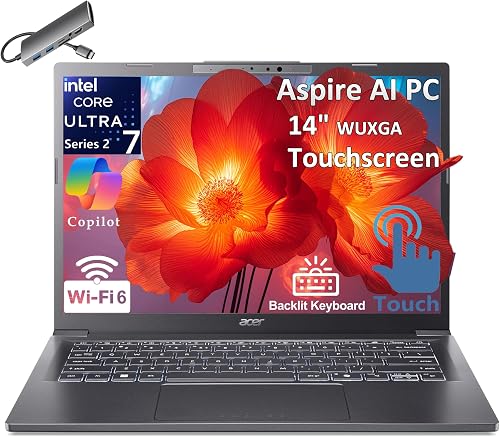
Best budget: Acer Aspire 14 AI
~$629NPU: 40 TOPS (AMD Ryzen 5 240) | Battery: Good
The most affordable Copilot+ certified laptop on this list. At under $650, you get the 40 TOPS minimum for full Windows AI features, 16GB RAM, and solid build quality. A genuine bargain for students and casual users.
View on Amazon →
Best battery life (Windows): HP OmniBook 5 14
~$799NPU: Intel Core Ultra (~40+ TOPS) | Battery: 28+ hours
In streaming battery drain tests, the HP OmniBook 5 14 outlasted both the MacBook Pro M4 and MacBook Air M4, hitting over 28 hours. Remarkable for a Windows laptop at this price.
View on Amazon →Quick comparison table
| Laptop | NPU TOPS | Developer Tooling | Battery | Best For | Price |
|---|---|---|---|---|---|
| MacBook Air M5 | 60+ | Core ML / MLX | 18 to 20 hrs | Overall best | ~$1,099 |
| ASUS ROG Flow Z13 | Ryzen AI Max+ | Ryzen AI / DirectML | Moderate | AI power users | ~$1,799+ |
| ASUS Zenbook S16 | 50 TOPS | Ryzen AI / DirectML | Full day | Creatives | ~$1,299 |
| Dell 14 Plus | 47 TOPS | OpenVINO / DirectML | 20 hrs | Business | ~$1,199 |
| ASUS Zenbook A14 | 45 TOPS | Qualcomm AI Engine / DirectML | 33 hrs | Travel | ~$1,099 |
| HP OmniBook 5 14 | 40+ TOPS | Qualcomm AI Engine / DirectML | 28+ hrs | Battery life | ~$799 |
| Acer Aspire 14 AI | 40 TOPS | Ryzen AI / DirectML | Good | Budget | ~$629 |
Should you buy now or wait? Laptop prices are expected to rise through 2026 due to DRAM and NAND shortages. If you see a good deal on a current gen Copilot+ PC, buying sooner can save money. Windows 12 is expected to need 50 or more TOPS for new AI features. Aim for 50 or more TOPS and at least 32GB RAM for longer use.